
Issue with File Explorer Window Closing Randomly and WordPerfect Crashing
Symptoms were as follow:
- Users reported file explorer window was randomly closing, and WordPerfect documents with open documents were closing and/or crashing.
- Extensive ping tests revealed no packet losses, no issues with networking.
- When the issue occurred, it did not happen to everyone simultaneously.
After scratching my head and pouring through Event logs and IDS logs, I began doing research on-line and stumbled upon an article that stated that re-used mapped drives using group policies could be the issue if a group policy with the update function was not used.
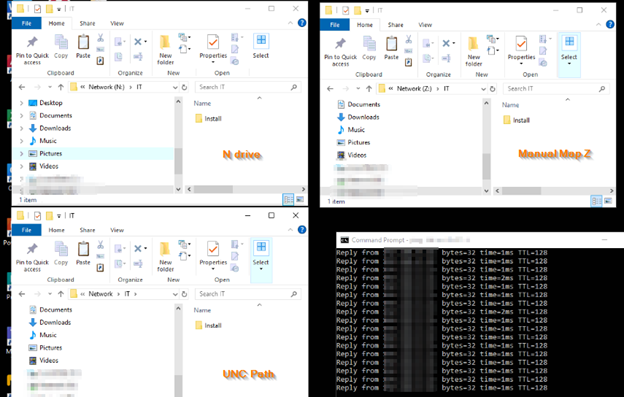
After checking the mapped drives GP, an update policy was in place but I decided to test regardless. I opened three file explorer windows, one to the existing mapped drive that had the issue N: and another to a newly created, manually mapped drive letter Z: and finally, one to a UNC path to the shared folder.
After waiting some time, I noticed that the N: drive was the only file explorer window that was closing, the manually mapped drive and the UNC path file explorer window did not close.
I was able to fix the issue using two methods:
- I manually mapped the N: drive to the UNC path on all workstations.
- I removed the replace function from the drive mapping GPO and left the update function only.
When mapped drives are deployed via Group Policy Preferences (GPP), the action setting matters:
- Create
- Replace
- Update
- Delete
If the drive is configured as Replace, Windows will:
- Delete the existing mapped drive
- Recreate it during policy refresh
When that happens:
- Any open File Explorer window pointed to that drive will close
- Any application (like WordPerfect) with open files on that drive may crash or close
- It does not affect all users simultaneously (because GP refresh timing varies per workstation)